The Phomemo P12 Label Maker Machine review centers on a compact, app-controlled printer for people who want to make labels for storage, school supplies, crafts, and gifts.
Its mix of thermal and thermal-transfer printing, template options, and USB-C or battery power makes it flexible for small organizing jobs.
Phomemo P12 Review Summary
The quick verdict
1,000+ ratings
Read Amazon ReviewsPhomemo P12 Label Maker
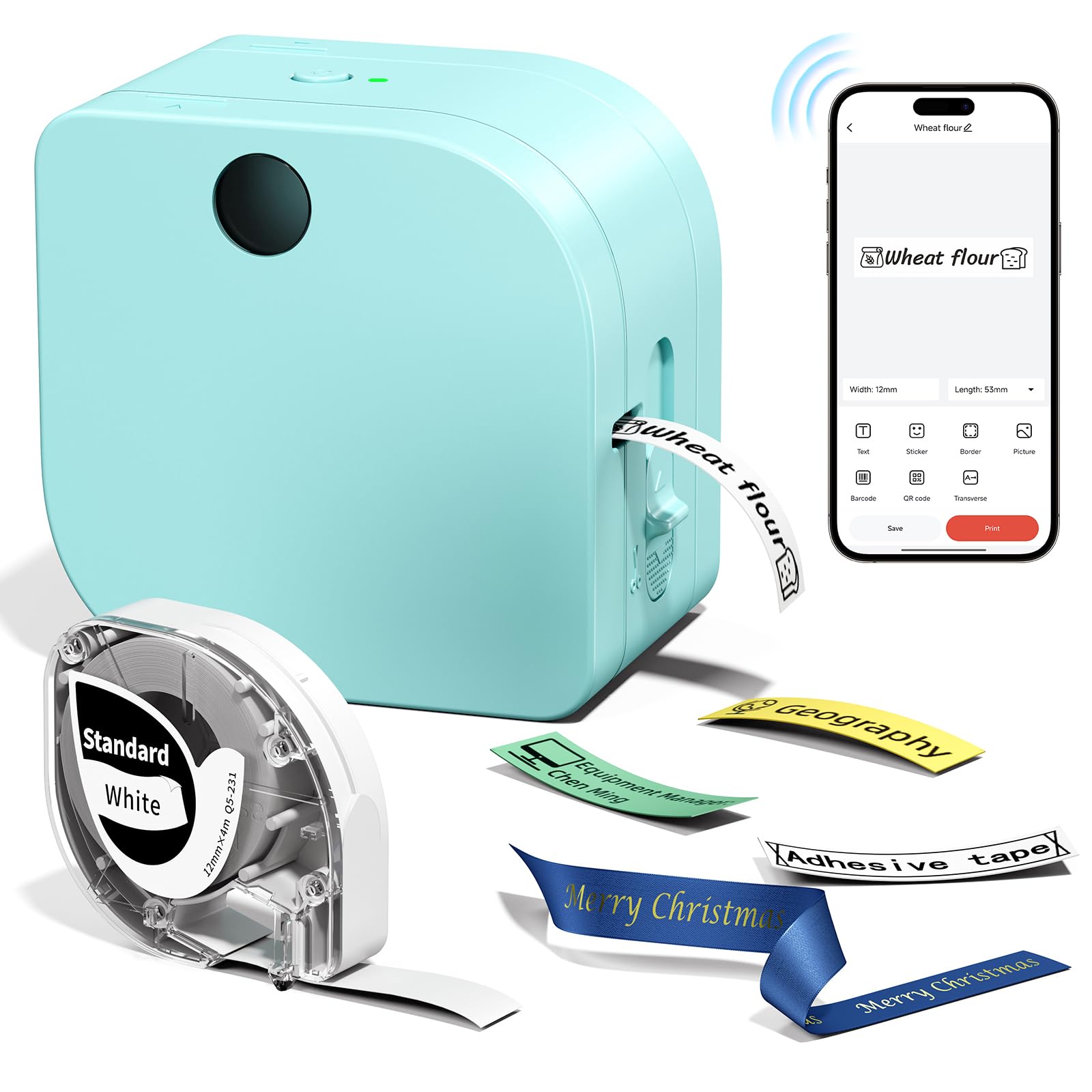
A portable Bluetooth label maker for households, teachers, and crafters who want customizable labels without ink or toner.
- Uses thermal and thermal-transfer printing, with no ink or toner required.
- Connects to a phone through Bluetooth and works with the Print Master app.
- The app includes label templates, more than 1,000 symbols, more than 500 borders, and more than 100 fonts, with OCR and speech recognition also described.
- Supports a range of label materials and styles, including ribbon and heat-transfer labels, as well as fluorescent and thermal paper.

Pros
- Offers a broad set of app-based design tools for customizing labels.
- Supports more than one label style, making it useful for organization as well as some craft and gift projects.
Consider before buying
- The six AAA batteries needed for cable-free use are not included.
- Phone-based design depends on using the companion app and Bluetooth connection.
Read the full review summary
The P12 pairs pocket-sized portability with phone-based label design, a built-in cutter, and support for several label styles, including ribbon and heat-transfer labels.
The supplied tape is a useful starting point, while the choice of USB-C power indoors or six AAA batteries for cable-free use gives it more placement flexibility than a desk-bound organizer.
It is best suited to occasional, varied labeling around a home, classroom, or craft table, especially when custom fonts, borders, symbols, or templates are useful.
Consider how often you will print and which label materials your projects need; a small handheld format is convenient for short tasks, while a larger or more specialized machine may suit high-volume work better.
The buying factors
Phomemo P12 Scorecard
Editorial scores reflect listed features and buyer fit; they are not laboratory measurements or customer ratings.
Portability
Palm-sized construction and a choice of USB-C or AAA battery power suit use in different rooms or away from an outlet.
Design flexibility
The companion app offers many templates, symbols, borders, and fonts, along with OCR and speech-recognition support.
Label versatility
The described print options include thermal paper, ribbon, fluorescent labels, and heat-transfer labels for different organizing and craft uses.
Setup and handling
Bluetooth phone operation and a built-in manual cutter keep the basic print-and-cut workflow straightforward.
Power flexibility
USB-C power is suited to an indoor setup, while six AAA batteries allow use without a cable; batteries are separate.
Large-job suitability
The compact format and handheld cutter look most practical for individual labels and small batches, rather than demanding production runs.
Key Features and Specifications of Phomemo P12
- Uses thermal and thermal-transfer printing, with no ink or toner required.
- Connects to a phone through Bluetooth and works with the Print Master app.
- The app includes label templates, more than 1,000 symbols, more than 500 borders, and more than 100 fonts, with OCR and speech recognition also described.
- Supports a range of label materials and styles, including ribbon and heat-transfer labels, as well as fluorescent and thermal paper.
- Compact, pocket-friendly design with a built-in manual cutter.
- Can be powered through the included USB-C cord or by six AAA alkaline batteries, which are not included.
Pros and Cons of Phomemo P12
Pros
- Offers a broad set of app-based design tools for customizing labels.
- Supports more than one label style, making it useful for organization as well as some craft and gift projects.
- Small format and battery option make it easier to move between work areas.
- No ink or toner to replace for its described thermal printing.
Consider before buying
- The six AAA batteries needed for cable-free use are not included.
- Phone-based design depends on using the companion app and Bluetooth connection.
- A handheld cutter and compact format may feel less convenient for frequent large batches than a setup designed around high-volume labeling.
Who Should Buy Phomemo P12?
Good fit
Consider the P12 if you want one compact printer for labeling jars, folders, classroom supplies, personal items, or craft projects.
The app’s templates and design elements are helpful when you want more than plain text, and support for ribbon and heat-transfer label styles opens up additional project possibilities.
It also makes sense if you expect to print in different places. USB-C power can suit a regular indoor station, while AAA batteries offer a way to work without keeping the printer tethered to a cable.
Choose your power arrangement based on where you expect to use it most.
Before buying, identify the label materials and widths your projects require, then confirm they match the supplies you plan to use with the P12.
That check matters especially if clothes, gifts, or other specialty projects are the main reason you want a label maker.
Who should skip it
Skip it if you need a dedicated high-throughput label setup for frequent, lengthy print sessions; its small handheld form and manual cutting are better suited to everyday personal tasks.
It may also be a poor fit if you want to design labels without a phone or need battery power included in the box. The described workflow uses a Bluetooth-connected app, and batteries must be supplied separately.
How the Phomemo P12 Fits Everyday Labeling
A mobile workflow for small organizing jobs
Bluetooth operation shifts label creation to a phone, where the app supplies templates and text-design options.
That can make it easier to tailor labels for different shelves, folders, or school items without editing each one on the printer itself.
More than basic paper labels
The range of described materials—thermal paper, ribbon, fluorescent, and heat-transfer labels—makes the P12 relevant to both organization and creative projects.
Buyers should match each intended use to a compatible label supply before relying on it for a particular surface or garment.
Power choice affects where it works best
USB-C operation can support a consistent home or office spot, while six AAA batteries let the printer move without a cable.
If portability is central to your use, factor in keeping the batteries on hand; for a fixed station, the included cord is the simpler route.
Alternatives to Phomemo P12
No distinct competing model is recommended here; the supplied comparable option is another P12 description. Compare label materials, app features, and included supplies against your needs before choosing a different model.
Typewriters alternative
1,000+ ratings
Read Amazon ReviewsPhomemo P12 Bluetooth Label Maker
The two descriptions identify the same P12 family, so this is not a distinct model recommendation.
The alternative’s details may help buyers confirm interest in 300 dpi output, multi-line labels, or barcode and QR-code support, but check the exact configuration and included supplies before choosing.
- This P12 description specifies a 180-gram design, 300 dpi printing, labels up to three text lines, and support for barcodes and QR codes.
- Its app details include 11 or more languages, 25 or more fonts, and 12 or more frames; the package is described as containing one roll of 12 mm by 4 m tape, a USB cable, and a manual.
- The main P12 description emphasizes a wide app-design selection, several label styles, a manual cutter, and USB-C or six AAA battery power.
Is Phomemo P12 Worth It?
The Phomemo P12 is worth considering for home, school, and craft users who want a small Bluetooth label maker with flexible app design and more than one label style.
Its two power options add useful placement flexibility, while the manual cutter and handheld form fit personal organizing better than sustained high-volume work.
Check that the label materials suit your planned projects and decide whether you prefer USB-C power or separately purchased AAA batteries. If that balance matches your routine, the P12 offers a practical mix of portability and customization.
Your review at a glance
1,000+ ratings
Read Amazon ReviewsPhomemo P12 Label Maker
A portable Bluetooth label maker for households, teachers, and crafters who want customizable labels without ink or toner.
- Uses thermal and thermal-transfer printing, with no ink or toner required.
- Connects to a phone through Bluetooth and works with the Print Master app.
- The app includes label templates, more than 1,000 symbols, more than 500 borders, and more than 100 fonts, with OCR and speech recognition also described.
- Supports a range of label materials and styles, including ribbon and heat-transfer labels, as well as fluorescent and thermal paper.