The VIVO Dual LED LCD Monitor Mount review is for anyone arranging two screens on a desk and looking for flexible positioning without a desk clamp.
Its freestanding base supports compatible monitors up to 38 inches, with a key space and stability tradeoff to consider before choosing it.
VIVO Dual Mount Review Summary
The quick verdict
16,000+ ratings
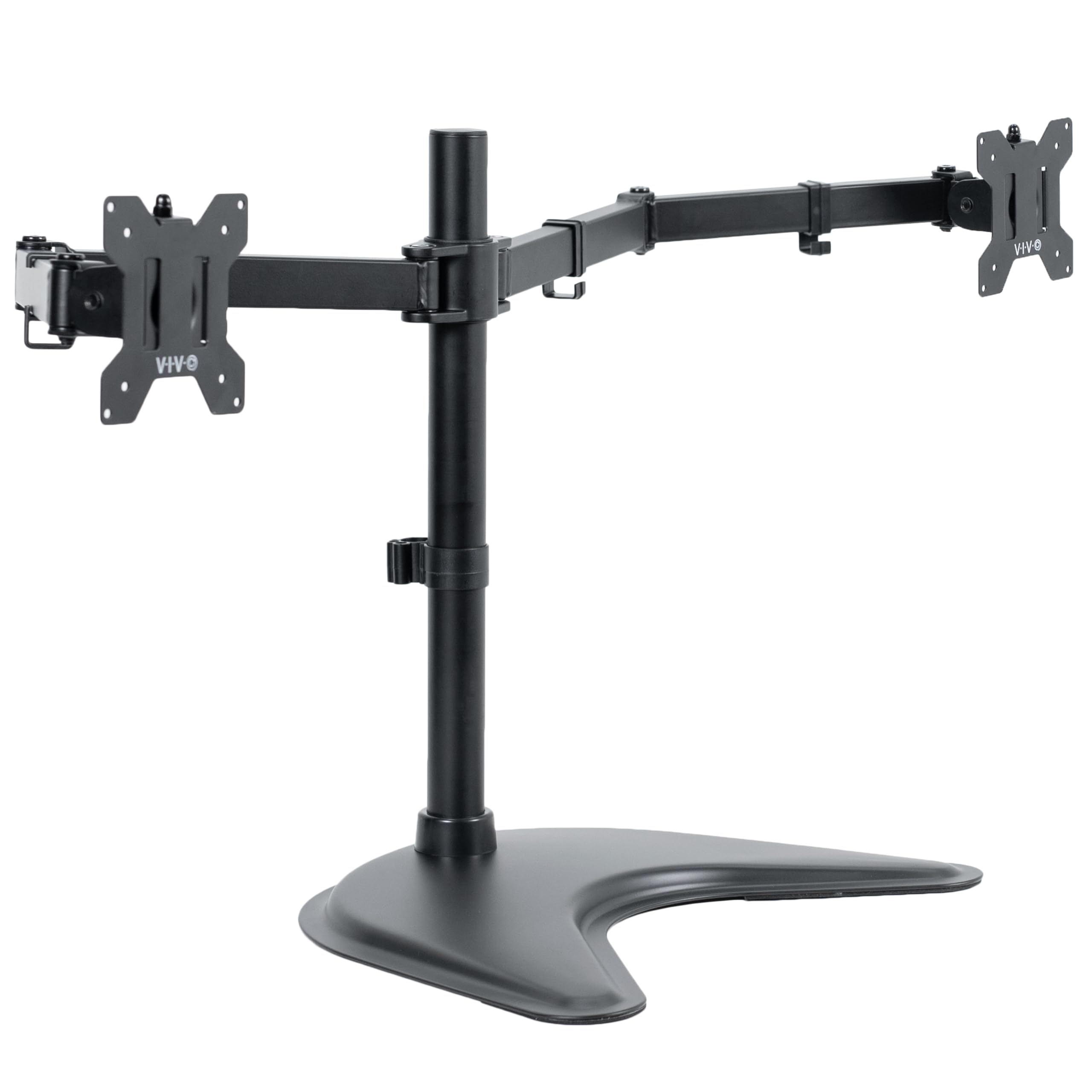
Read Amazon ReviewsVIVO STAND-V038F Dual Monitor Mount
A freestanding dual monitor mount for desk setups with two VESA-compatible screens, including ultrawides up to 38 inches.
- Holds two monitors from 13 to 38 inches, each weighing up to 22 pounds.
- Fits monitors with 75 x 75 mm or 100 x 100 mm backside VESA mounting holes.
- Arms offer +90° to -90° tilt, 180° swivel, 360° rotation, and height adjustment along the center pole.
- Freestanding base measures 16.3 x 12.8 inches and has padding underneath to help protect the desk surface.

Pros
- Accommodates two large screens, including displays up to 38 inches, within the stated weight and VESA limits.
- Offers extensive screen movement for adjusting tilt, orientation, and side-to-side position.
Consider before buying
- The 16.3 x 12.8 inch base takes up a meaningful amount of desk surface; check the available footprint first.
- The guidance cautions that screens pulled too far forward or backward can affect stability unless the stand is bolted down.
Read the full review summary
The VIVO STAND-V038F is built around a substantial desk base and two articulating arms.
Each arm supports a screen from 13 to 38 inches and up to 22 pounds, provided it has a 75 x 75 mm or 100 x 100 mm VESA pattern.
The size range makes the stand relevant to dual ultrawide arrangements as well as more conventional screens, while height adjustment along the center pole and broad tilt, swivel, and rotation ranges give you several ways to orient the displays.
This design suits buyers who want to keep a mount freestanding and can spare desk space for its 16.3 x 12.8 inch base.
It includes detachable VESA plates, cable clips, padded protection under the base, and assembly hardware and instructions.
Its own guidance also matters: moving the monitors far forward or backward can create stability issues unless the stand is bolted down, so it is better suited to a layout that stays within the base’s center of gravity.
The buying factors
VIVO Dual Mount Scorecard
Editorial scores reflect listed features and buyer fit; they are not laboratory measurements or customer ratings.
Screen compatibility
Supports two 13-to-38-inch screens up to 22 pounds each with common 75 x 75 mm or 100 x 100 mm VESA patterns.
Positioning range
Tilt, swivel, rotation, and center-pole height adjustment allow a broad range of screen orientations and viewing angles.
Freestanding convenience
The base avoids relying on a desk-edge clamp, though it occupies a sizeable footprint.
Stability considerations
The mount has a heavy-duty base, but the manufacturer cautions against pulling monitors too far forward or backward unless bolted down.
Cable organization
Detachable clips on the arms and center pole provide a straightforward way to guide power and AV cables.
Setup practicality
Detachable VESA plates, included hardware, and instructions are intended to simplify assembly and monitor mounting.
Key Features and Specifications of VIVO Dual Mount
- Holds two monitors from 13 to 38 inches, each weighing up to 22 pounds.
- Fits monitors with 75 x 75 mm or 100 x 100 mm backside VESA mounting holes.
- Arms offer +90° to -90° tilt, 180° swivel, 360° rotation, and height adjustment along the center pole.
- Freestanding base measures 16.3 x 12.8 inches and has padding underneath to help protect the desk surface.
- Detachable cable clips on the arms and center pole help organize power and AV cables.
- Detachable VESA plates, assembly instructions, and hardware are included.
- The product carries a three-year warranty.
Pros and Cons of VIVO Dual Mount
Pros
- Accommodates two large screens, including displays up to 38 inches, within the stated weight and VESA limits.
- Offers extensive screen movement for adjusting tilt, orientation, and side-to-side position.
- Freestanding design can suit desks where a clamp mount is not the preferred setup.
- Padded base and detachable cable clips address desk protection and basic cord organization.
Consider before buying
- The 16.3 x 12.8 inch base takes up a meaningful amount of desk surface; check the available footprint first.
- The guidance cautions that screens pulled too far forward or backward can affect stability unless the stand is bolted down.
- Compatibility depends on each monitor meeting the 22-pound limit and having one of the supported VESA patterns.
Who Should Buy VIVO Dual Mount?
Good fit
Consider the VIVO Dual Mount if you want a two-screen freestanding stand and your displays fall within the 13-to-38-inch, 22-pound-per-screen limits.
The wide movement range can help with a side-by-side arrangement that needs periodic tilt or orientation changes, while the height adjustment along the pole gives you another way to align the screens.
Before buying, measure a clear area at least as large as the base and check both monitors’ weight and VESA-hole spacing.
Also plan where the screens will sit relative to the pole and base: the product’s guidance specifically cautions against pulling them far forward or backward unless the stand is bolted down.
For a fixed workstation that can accommodate the base and keep the monitors centered, the included cable clips and detachable mounting plates make this a practical, feature-rich option.
The three-year warranty may also be useful for buyers comparing long-term support.
Who should skip it
Skip this stand if your desk cannot spare a 16.3 x 12.8 inch footprint or if you need to move the screens far forward and backward as part of your normal workflow without bolting the mount down.
Look elsewhere if either monitor exceeds 22 pounds, falls outside the stated screen-size range, or lacks a compatible VESA pattern.
How the VIVO Dual Mount Fits a Two-Screen Desk
Check the monitors as a pair
The listed size range is broad, but compatibility is determined by more than screen diagonal. Each monitor must weigh no more than 22 pounds and have 75 x 75 mm or 100 x 100 mm backside VESA holes.
Check those details for both displays before planning the arrangement, particularly when mixing a large screen with a smaller one.
Plan around the base
A freestanding base saves the need to attach the mount at the desk edge, but its 16.3 x 12.8 inch dimensions make desk space part of the compatibility decision.
Measure the spot where the stand will sit, including the area needed for the screens and their cables. The padding underneath is a helpful surface-protection detail, not a substitute for checking that the base fits.
Use the motion range deliberately
Tilt, swivel, rotation, and pole height adjustment support different viewing angles and landscape or portrait arrangements. That flexibility is most useful when you establish a stable working position first and then make smaller adjustments.
The product guidance warns against pulling screens too far forward or backward unless the stand is bolted down, so frequent, wide repositioning deserves special consideration.
Expect straightforward cable routing
Detachable clips along the arms and center pole give cables a route that follows the mount. The clips can help keep wires gathered as the arms move, though buyers should leave enough slack for the chosen monitor positions.
Detachable VESA plates also make it possible to attach the plates to the screens before mounting them onto the arms.
Alternatives to VIVO Dual Mount
Computer Monitor Arms alternative
2,000+ ratings
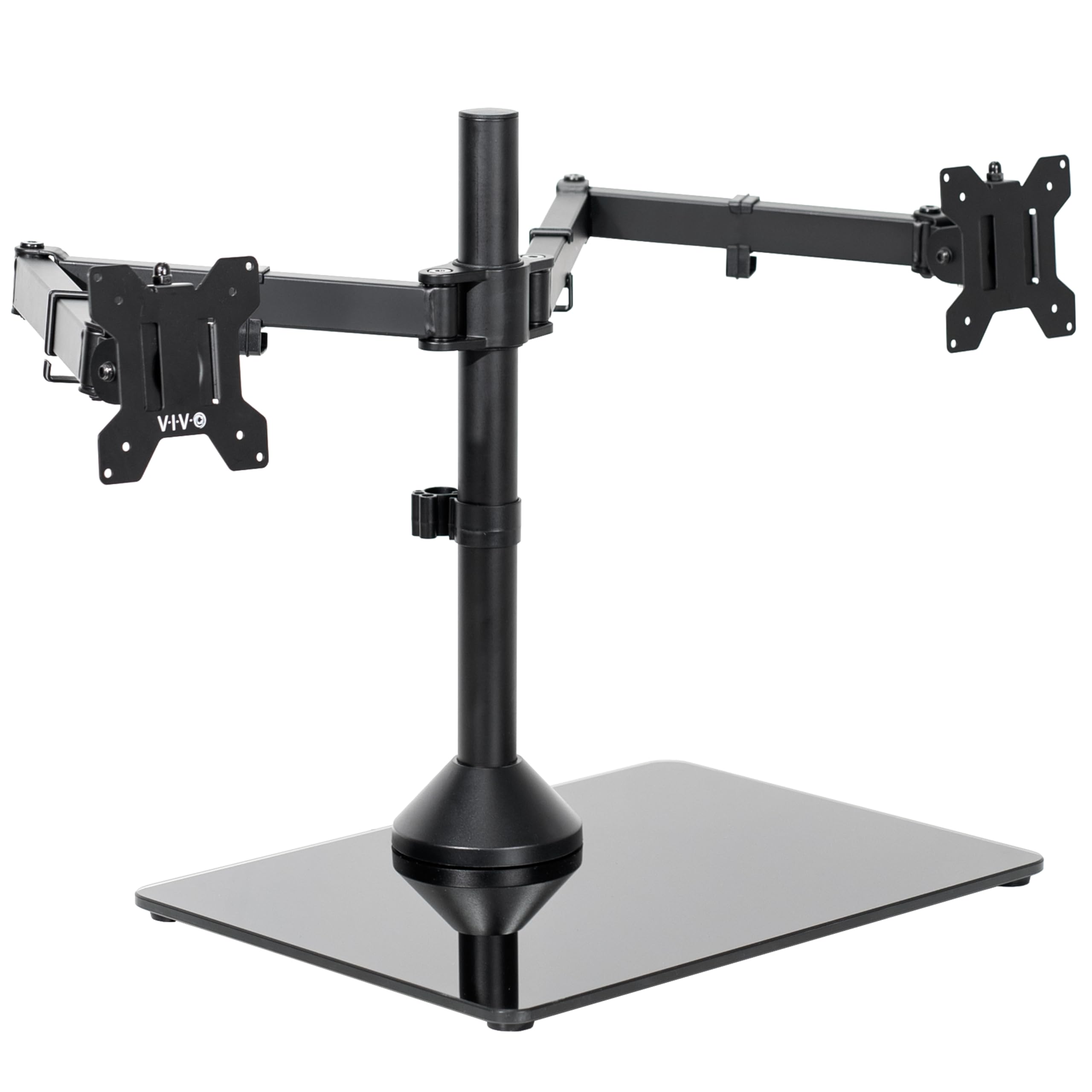
Read Amazon ReviewsVIVO STAND-V038FG Dual Ultrawide Monitor Mount
Compare the V038FG if you prefer its tempered-glass base and have room for its slightly wider footprint.
The V038F is the more compact of these two listed base dimensions, while both share the stated screen limits and positioning features.
- The STAND-V038FG also supports two screens up to 38 inches and 22 pounds each, with a 17 x 12.8 inch tempered-glass base, padded underside, and articulating arms.
- The STAND-V038F uses a 16.3 x 12.8 inch base and supports two screens up to 38 inches and 22 pounds each, with a caution about pulling them too far forward or backward unless bolted down.
Computer Monitor Arms alternative
3,000+ ratings
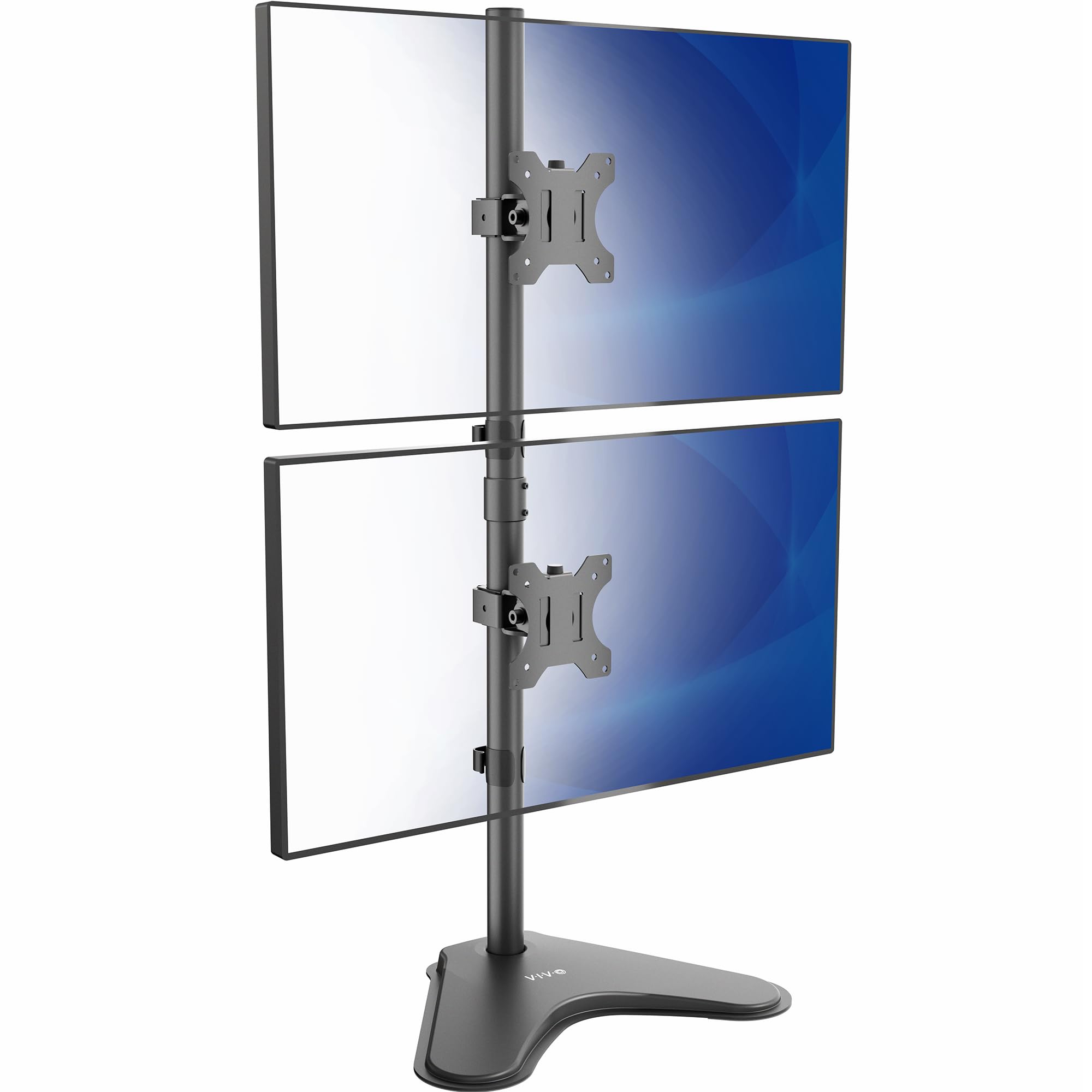
Read Amazon ReviewsVIVO STAND-V002L Vertical Dual Monitor Stand
Choose the V002L if a vertical, top-and-bottom layout better matches your desk or workflow and your screens are no larger than 34 inches.
The V038F is the better fit when you want its two-arm arrangement and support for screens up to 38 inches.
- The STAND-V002L is a freestanding mount for two screens stacked vertically, up to 34 inches and 22 pounds each, with tilt, swivel, rotation, and a 15.4 x 12.4 inch base.
- The STAND-V038F places two screens on articulating arms and supports displays up to 38 inches each, with a 16.3 x 12.8 inch base.
Is VIVO Dual Mount Worth It?
The VIVO STAND-V038F is worth considering for a dual-screen setup that needs broad monitor compatibility and flexible positioning in a freestanding design.
Its strongest case is support for two screens up to 38 inches, combined with extensive arm movement and included cable clips.
Measure the base area and confirm both screens’ weight and VESA patterns before buying.
If your desk can accommodate the stand and your layout keeps the monitors within a stable position, it is a practical choice; if you need substantial forward-and-back movement, account for the product’s bolting guidance.
Your review at a glance
16,000+ ratings
Read Amazon ReviewsVIVO STAND-V038F Dual Monitor Mount
A freestanding dual monitor mount for desk setups with two VESA-compatible screens, including ultrawides up to 38 inches.
- Holds two monitors from 13 to 38 inches, each weighing up to 22 pounds.
- Fits monitors with 75 x 75 mm or 100 x 100 mm backside VESA mounting holes.
- Arms offer +90° to -90° tilt, 180° swivel, 360° rotation, and height adjustment along the center pole.
- Freestanding base measures 16.3 x 12.8 inches and has padding underneath to help protect the desk surface.